FairPlay sign-in, tab by tab
FairPlay Login — Fast Entry by Phone or Username, Seven Pins Explained
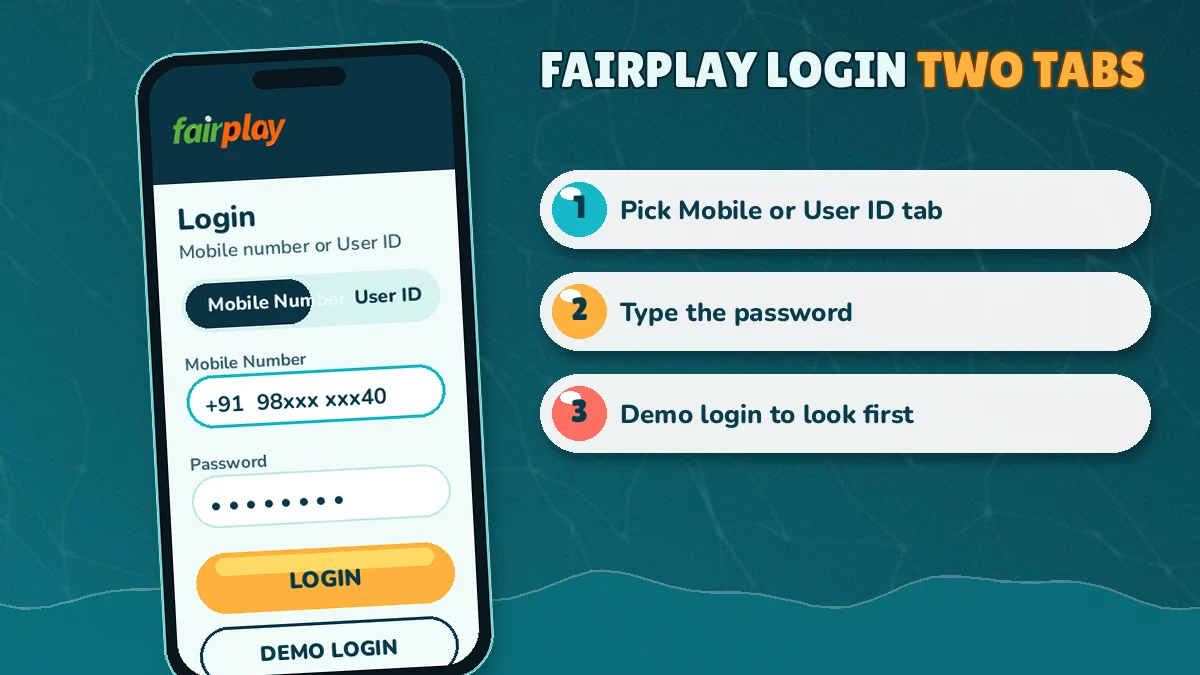
Choose a tab, fill one field, add the password, press Login: that is FairPlay login on any address. The Mobile Number tab takes 10 digits after a fixed +91, and the User ID tab takes the ID exactly as issued. Most rejected attempts are the right details under the wrong tab.
- 2 login modes
- +91 and 10 digits
- Demo Login, no deposit
- 24x7 WhatsApp desk

FairPlay login
or continue with WhatsApp
Stuck? Ask the FairPlay deskNo FairPlay account yet? Register here
Pick the tab you registered with, then the password. That is all the card asks.

Two tabs, one account
FairPlay Login by Mobile or User ID — Which Fast Route Fits You
Registered with an OTP and never picked a username? Use the Mobile Number tab. Set a User ID during sign-up, or got one handed to you in a WhatsApp chat? Use the User ID tab. Both open the same FairPlay account with the same password and the same balance, so the choice only decides what goes in the first field.
That is the short version. Below, a table lines the two routes up side by side, because most failed attempts on the FairPlay card come down to one thing: the right details typed under the wrong tab.
| What you are checking | Mobile Number tab | User ID tab |
|---|---|---|
| First field | 10 digits after the fixed +91 | The User ID exactly as it was issued |
| Who normally uses it | Anyone who signed up with a mobile number and one OTP | Players who ticked "Want To Set User ID", or received a ready ID from the WhatsApp desk |
| Second field | Your FairPlay password | Your FairPlay password (the same one) |
| If you forget the first field | It is your own phone number, so rarely a problem | Scroll back through the WhatsApp chat, or ask the desk |
| If you forget the password | OTP to the registered mobile, then a new password | Same OTP route, or a reset through the WhatsApp desk |
One case trips people up more than the others. Someone signs up on their phone with an OTP, sets a User ID on the way through because the option was there, forgets about it, and weeks later types their mobile number into the User ID tab. Refused, every time. Nothing is wrong with the FairPlay account, the entry simply went into the wrong box.
Part of the confusion is vocabulary. On the WhatsApp desk and across most search results, "FairPlay ID" means the whole account: the thing you register, fund and play on. "FairPlay login ID" usually means something narrower, the User ID that goes in the second tab. Every account has an ID in the first sense. Not every account has one in the second.
ways to fill the first FairPlay field, and a single password that serves both of them.
If you honestly cant remember which route you used, try the mobile tab first. It is the default one on the card, and it is the route every OTP registration starts from.
Setting up a new account and wondering whether to bother with a User ID? It is optional. FairPlay's registration form has a "Want To Set User ID" step you can skip, and plenty of players skip it, because the mobile number already works as a login on its own. Set one if you would rather not type your phone number on a shared laptop, or you just like a short name. Either way the password is the same, and so is everything behind it.
Step by step
FairPlay Log In Steps — Quick Routes for Mobile and User ID Accounts
FairPlay log in takes four or five taps on either route: open the official card, pick the tab, fill the first field, type the password, press Login. Each list below goes field by field, with the small details that decide whether the card lets you through on the first attempt or throws you back.
FairPlay Login Number Route — Fast Steps With Your Mobile
- Start from the button, not a bookmarkOld bookmarks can point at a blocked address. The FairPlay Login button here goes to whichever address is live.
- Stay on Mobile NumberThis tab is selected by default. +91 is already fixed in front of the field.
- Ten digits, nothing elseThe number on the account, without spaces. A leading zero or a second +91 makes it eleven or more.
- Password nextSame field for both tabs. Long passwords typed on a phone keyboard go wrong more often than people expect, which is what the eye icon is for.
- Press LoginIf both fields match the account, the next screen is yours. If not, the card stays where it is; the error list further down says why.
Step three is where the typing goes wrong most often. Because +91 sits there already, adding it again (or a 0 in front, out of habit from dialling) pushes the number past ten digits. Probably the single most common reason a correct FairPlay login number gets rejected.
FairPlay Login ID Route — Secure Steps With a User ID
- Switch to the User ID tabTap it once. Out goes the mobile field; a User ID field takes its place.
- Paste, don't retypeTake the ID from the registration screen or the desk's chat, character for character.
- Add the same passwordThere is one password per FairPlay account, whichever tab you use.
- Press LoginThe same lobby opens as on the mobile route.
Hard to say whether every FairPlay address treats capital letters in a User ID strictly. Copy-paste from the chat and the question never comes up.
IDs issued by the desk come with a password already set, sent in the same chat. That pair is complete on its own. Nothing else needs registering before the User ID tab will take it.
FairPlay Login Through WhatsApp — The Official Desk Route
Two kinds of player end up pressing Continue with WhatsApp on the FairPlay card. One has no account and would rather let the desk create it; the other is locked out and no longer has the registered phone. Both chats finish the same way, with credentials or a fresh password, and the sign-in itself then happens back on the card.
The card, annotated
FairPlay Login Card Replica — Every Official Field Pinned
Here is the FairPlay sign-in card laid out large, with a numbered buoy on each part that matters. Match a number on the left to the note on the right. This replica is a drawing, not a working form, so use the real FairPlay login card at the top of the page when you actually want to get in.
- Mobile Number tabDefault tab. One field with +91 fixed in front; you add 10 digits.
- User ID tabFor accounts that have a User ID. Swaps the mobile field for an ID field.
- Password and eye iconShared by both tabs. The eye shows the characters so you can catch a typo before sending.
- Forgot Password?Starts the reset: registered mobile, OTP, new password.
- LoginSends what you typed. Real balance, real markets.
- Demo LoginPin five's neighbour. Worth a tap for a look around; whatever it shows stays inside demo and never reaches your wallet.
- Continue with WhatsAppReaches the 24x7 desk for a new ID, a reset or a stuck login.
Pins one and two decide everything below them. Three is where typos hide. Four is the exit when the password is gone for good, and our FairPlay login password reset page covers that path screen by screen, including the separate withdrawal password some players set.
Five and six sit next to each other, which causes its own small confusion. A player presses Demo Login by accident, sees a comfortable balance, and wonders where the deposit went. It didn't go anywhere. Log out and press the Login button instead, the one directly above.
Seven is the fallback for everything else on the FairPlay card. Chatting does not replace the password; it gets you an ID or a reset, and then you come back here and sign in the normal way.
FairPlay Login Search Terms — Official Answers in One Place
FairPlay Login and My FairPlay Login — One Verified Account
Search wording varies far more than the card does. Type fairplay login, fairplay log in or my fairplay login and you end up at the same two tabs; FairPlay online play begins there too. An old FairPlay ID and a FairPlay new ID made this morning pass through the identical form. Lost the FairPlay login password? Pin four, the FairPlay password reset, is the way back in.
FairPlay Pro, FairPlay 24 and Other Live Addresses — Same Trusted Login
A login page that simply will not load is, more often than not, a domain that got blocked. Then the card turns up on another address under another name: FairPlay pro, FairPlay pro com, FairPlay live, FairPlay 24, FairPlay login 24, FairPlay in 24, FairPlay 24 win, FairPlay global, FairPlay club, FairPlay 1 club, FairPlay 111, FairPlay gold, FairPlay red or FairPlay 777. Your two fields do not change between them, and neither does the balance they open.
FairPlay App and APK — Fast Sign-In on Android
iPhone owners have nothing to install: a home-screen shortcut to the browser version logs in exactly like the website. On Android, the FairPlay app download comes from the official site as a FairPlay apk, and the phone has to allow installs from the browser first. Whether you call it the FairPlay app, the FairPlay application or the FairPlay betting app, the sign-in card inside is this one, and a FairPlay bet placed there lands on the same balance.
FairPlay Sign Up, Games and Withdrawal — Trusted Next Steps
FairPlay sign up, FairPlay registration and FairPlay 24 registration run on a mobile number and one OTP, with an optional referral field where a FairPlay bonus code would go. After login, FairPlay games cover the FairPlay casino tables and FairPlay aviator, while FairPlay cricket markets run on a FairPlay cricket ID. FairPlay withdrawal goes out by UPI, and the FairPlay customer care number and FairPlay whatsapp number page lists how to reach the desk.
When the card says no
FairPlay Login Problem Fixes — Fast Checks for Each Error
Most FairPlay login problems are fixed in under a minute once you know which of five things went wrong: wrong tab, number typed with an extra digit, a password typo, a forgotten password, or an address that no longer loads. Work down the list in that order. It is roughly the order of how often each one happens.
- The card rejects details you are sure are right
- Check the tab first. A mobile number under User ID, or a User ID under Mobile Number, fails every time even when both halves are correct.
- The mobile number will not go through
- Count the digits: the FairPlay card already holds +91, so you type ten, no zero in front and no spaces in the middle.
- Password refused
- Tap the eye icon and read back what you typed. Auto-capitalised first letters and a stray space from autofill are the usual culprits.
- You no longer know the password
- That one has its own process. Pin four on the replica above starts it, and the password page linked there covers each screen.
- The page itself will not open
- A blank screen before the card even shows points at the address, not the account. Tap the FairPlay Login button on this page for the current one; the ID and balance are waiting there.
- No OTP arrives
- Confirm the number is the one on the account, wait a moment, then request it again. If it still does not land, message the desk.
- The registered number is no longer yours
- Without that SIM no OTP can reach you, so the mobile reset route is closed. Instead, the WhatsApp desk can look at the account and sort out access from the chat.
Keep the FairPlay Login button on this page as your starting point during a block. It follows the current address, so a bookmark to an old one stops mattering.
People sometimes search for a FairPlay login update as though the card itself had changed. In practice the fields stay the same; what changes is the address it loads on. Same two tabs, same password, same Login button. The ID you had yesterday still works today, just somewhere else.
One situation worth describing: a player on mobile data taps an old saved link during a match, gets a blank screen, assumes the account is locked and tries the password four or five times on a mirror that has since been retired. None of those attempts reached the account at all. Open the current address through the button and the first try is usualy fine.
Another mix-up that looks like a broken login: typing the withdrawal password into the sign-in card. Players who set a separate withdrawal password end up with two passwords on one FairPlay account, and under pressure its easy to reach for the wrong one. The card only accepts the login password. Your withdrawal password comes into play later, in the wallet, when money goes out.
Still stuck after all of that? The FairPlay WhatsApp desk is open 24x7 and handles resets and ID questions in the chat itself.
Practice mode
FairPlay Demo Login — Free Trial Balance With No Deposit
Why does Demo Login open when the real FairPlay login refuses you? Because the demo button never checks an account. That makes it a handy test: if demo loads and Login does not, the address is fine and the problem is in what you typed. The balance it gives you is pretend, needs no deposit, and cannot be withdrawn.
rupees to deposit before Demo Login opens the FairPlay lobby.
What is it actually good for? Mostly for learning the screens. The FairPlay exchange shows back and lay columns side by side, cricket has fancy and session markets on top of the match odds, and the casino tables each have their own chip layout. Seeing all of that once with play money makes the first real session much less fiddly. Then again, some players skip demo entirely and never miss it.
- Good for: learning where back, lay and the bet slip sit on a FairPlay market.
- Good for: opening a casino table like Teen Patti or Aviator to see how a round runs.
- Not for: withdrawals. Demo money cannot be cashed out.
- Not for: testing a real password. Demo does not check your account details.
It sits one row below the main FairPlay Login button, so it is always one tap away. Easy to hit by mistake, too, which matters more then it looks: a player lands on a comfortable practice balance and thinks a deposit has arrived.
Ready for the real account? A FairPlay sign up form takes a mobile number, the code, and a password, and the Login button above will take it from there.
Past the card
After FairPlay Login — Live Cricket, Casino and One Wallet
Nothing past the card asks you to sign in again. Casino tables, the cricket exchange and the wallet sit behind the same FairPlay session, and the figure at the top of the lobby is what every one of them draws on. Money moves in and out by UPI, from the wallet section.

- Exchange tab, no second sign-in: cricket from IPL and domestic T20 through to Test matches, where fancy and session lines sit alongside back and lay; football, tennis and kabaddi beside it.
- Casino tab, same session: Teen Patti and Andar Bahar tables, Dragon Tiger, Lucky 7, roulette, baccarat, blackjack, plus Aviator-style crash rounds.
- Wallet section, same balance: UPI in, UPI out.
The FairPlay lobby puts the balance at the top, so the first thing you see after login is whether a deposit has landed. From there it is a tap to cricket or to the casino tables. For the account area, statement and settings included, see the My FairPlay account page.
On a phone the same FairPlay login works in the browser and in the Android APK. Nothing about the card changes between the two; the FairPlay app for Android page covers the install and the browser setting it needs, and iPhone users get by with a home-screen shortcut.
A first session after login usually runs in the same order: glance at the balance, top up through UPI in the wallet if it is empty, then pick a match or a table. Twenty minutes of looking around in demo beforehand makes that order feel natural, though it is not required.
FairPlay Login Update — Same ID on Every Official Address
When a FairPlay address gets blocked, a new one takes over and the same ID and balance open there, whether you type www fairplay login into a search bar or use the button here. How that switch works is on the FairPlay 24 address page.
FairPlay Login Help — Quick Answers Straight From the Card
How do I do FairPlay login step by step?
Open the FairPlay login card, choose the Mobile Number or User ID tab, fill that field, type your password and press Login. The lobby opens with your balance, the sports exchange and the casino. If the card refuses you, check the tab before anything else, since that is the most common cause.
Can I log in to FairPlay with my mobile number?
Yes. The Mobile Number tab is the default on the FairPlay login card. The +91 code is already fixed, so you type only the 10 digits you registered with, then your password. Leave out any leading zero or extra country code, or the number will not match your account.
How do I use my FairPlay login ID instead of a phone number?
Switch the FairPlay card to its second tab, User ID, and paste the ID from wherever you got it: the registration screen if you set one yourself, or the WhatsApp chat if the desk created it. The password is the same one the account always uses. Press Login and the lobby opens as normal.
Why is my FairPlay login not working today?
Check four things in order: the tab matches your details, the mobile number is exactly 10 digits, the password is typed correctly using the eye icon, and the address still loads. Blocked addresses are common in India, and FairPlay moves your same ID and balance to a new working address.
What does FairPlay Demo Login do?
FairPlay Demo Login opens the lobby with a practice balance so you can explore markets and casino tables. It needs no deposit and nothing won in demo can be withdrawn. It does not check your real account details, so it cannot tell you whether your password is right.
I forgot my FairPlay login password. How do I reset it?
Nothing on the account is lost: your FairPlay ID, balance and open bets stay exactly as they were. You only need a new password, which the link under the password field issues after one OTP to your registered number, or which the WhatsApp desk sets for you. Then sign in on your usual tab.
Is FairPlay app login the same as the website login?
Yes. The FairPlay Android APK and the browser use the same login card and the same details: mobile number or User ID, then your password. Your balance and bets are shared between them because it is one account. On iPhone, a home-screen shortcut to the browser version does the same job.
FairPlay Login Searches — Popular Official Variants
Players also search for:
- fairplay login kaise kare
- fairplay login number
- www fairplay login
- fairplay login problem
- fairplay login update
- fairplay login id
- fairplay log in mobile se
- fairplay demo login
- fairplay password bhool gaye
- fairplay app login
FairPlay Login Next Steps — Trusted Account Pages
18+. Laws on online betting are not the same in every Indian state; the one you live in is the one that counts.